COMPARE.LISTS Examples
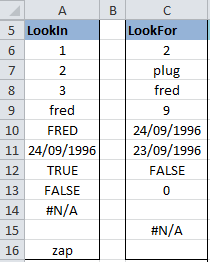
These examples use the following LookIn and LookFor lists
Note: although some of these cells appear empty A15, A16, C13, C16 are not empty,
A8 is empty.
A15 contains a single ‘ character
A16 contains a single space character
C13 contains a single space character
C14 is empty
C16 contains a single ‘ character
OUTPUT=1(Default): TRUE/FALSE
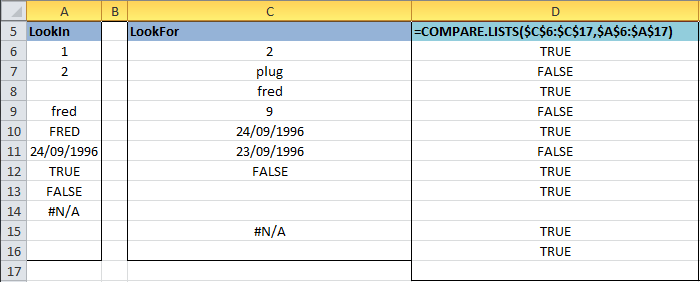
The results in cell D13 and D14 are blank because the empty cells in C13 and C17 have been ignored.
Cells C13 and C16 show TRUE because the LookIn list contains cells with a single space character and a single ‘ character.
Using OUTPUT=1 you can filter the LookFor list for matches, mismatches or empty cells.
OUTPUT=2: ** or space
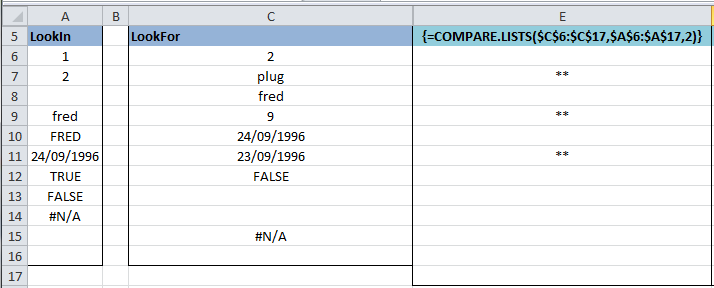
Using OUTPUT=2 you get ** for each mismatch: this is easier to see than visually scanning for FALSE.
OUTPUT = 3 and 4, single-cell non-array formula:

Using OUTPUT=3 as a single-cell non-array formula gives you a count of the mismatches. This is useful as a simple check that everything in the LookFor list can be found in the LookIn list.
Using OUTPUT=4 as a single-cell non-array formula gives you a count of the matches.
OUTPUT = 3: multi-cell array formula.
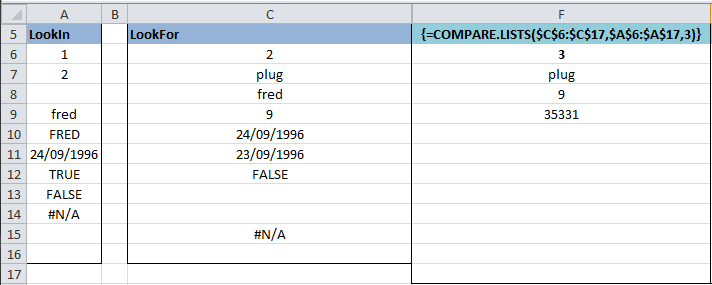
This option gives you a count (3 in this case) followed by a list of the mismatches.
Cell F9 shows 35331 which is Excel’s un-formatted representation of 23/09/1996.
OUTPUT =4: multi-cell array formula
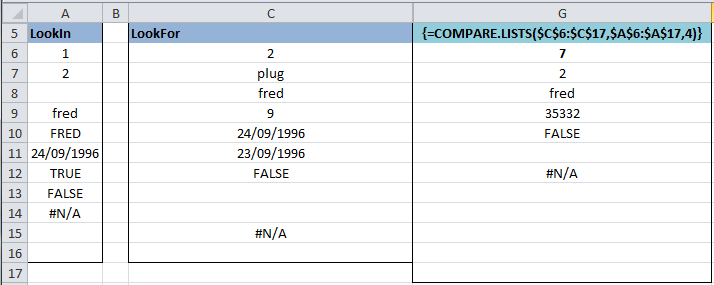
This option gives you a count (7) followed by a list of the matches.
Cell G12 shows #N/A because C15 matches A14.
Note that there are 7 matches listed although you can only see 5:
Cell G11 corresponds to the single space at C13 and is not actually empty.
Cell G13 corresponds to the ‘ character at C16 and is not actually empty.