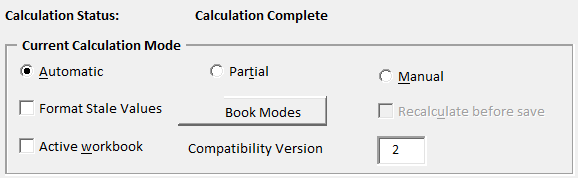
Excel Current Calculation Mode
You can use this form to view and change Excel’s current calculation status and settings.
|
By default the current Excel calculation mode applies to all the open workbooks. |
Excel’s default calculation mode is at the Excel session level. Whenever Excel calculates the default behavior is to calculate all the open workbooks, rather than just the active workbook |
Automatic
Formulas are recalculated automatically whenever anything changes so that the workbook(s) are always calculated.
Partial
Similar to automatic except that Excel Data Tables, Python formulas and automatic Pivot Tables are not automatically calculated. This can be useful with large workbooks because Excel Data Tables cause multiple calculations of the workbook.
Manual
|
The status bar will also show “Calculate” if there are circular references or ForceFullCalculation has been turned on. |
Formulas are only recalculated when the user requests it by pressing F9 or the FastExcel recalculate button. When the workbook is not completely calculated the status bar shows “calculate”. |
Recalculate before save.
If in Manual mode checking this option will cause Excel to recalculate uncalculated formulas in the workbook each time it is saved.
Format Stale Values
When in Manual or Partial calculation mode formulas that are currently uncalculated (Stale Values) will have Stale Value formatting applied.
Compatibility Version
Determines what compatibility version of the calculation engine is currently being used for the Active workbook.