GROUPS Function
Extracts group(s) of adjacent characters from a text-string or an array/range of text-strings.
The characters to include in the group are defined by GroupType. GroupType can either be a Regular Expression pattern or a number for pre-defined group types:
0 – Numeric Digits (0-9)
1 – Alphabetic characters (a-zA-Z)
2 – All characters except numeric digits 0-9
3 – Numeric Digits 0-9 and the decimal separator character
4 – All characters except numeric digits 0-9 and the decimal separator character
You can choose either to select all groups or the nth group from the start or end of the text-string.
You can set the maximum number of characters to be returned, either from the left or the right of the result set of characters.
You can also control the start and end point of the search for groups within the text-string.
GROUPS is a multi-threaded, non-volatile array function.
GROUPS Syntax
GROUPS (Text, GroupNumber, MaxChars, GroupType, StartPos, EndPos)
Text (Required)
The text to extract the groups of characters from. Can be a range or array or a constant or any expression that returns a string/strings..
GroupNumber (Optional, default 1)
The position number of the group to be extracted from within the text-string.
A value of zero extracts all the groups within the text-string and concatenates all the groups of characters.
A positive number extracts the Nth group from the start of the text-string, working forwards.
A negative number extracts the Nth group from the end of the text-string, working backwards.
MaxChars (Optional, default 0)
The maximum number of characters to be returned. A value of zero returns all the extracted characters. A positive number restricts the number of characters starting from the left: for example 3 would return only at most the 3 leftmost characters from the extracted characters. A negative number restricts the number of characters starting from the right, so a value of -3 would return only at most the 3 rightmost characters from the extracted characters.
GroupType (Optional, default 0)
Defines the type of characters to be considered as part of a group and returned. If GroupType is a string it will be treated as a regular expression pattern that defines which characters that will be considered part of a group. If GroupType is a number it will select one of the pre-defined Regular Expression patterns.
Any characters not defined as part of a group will act as separator characters between groups.
The numbers for the pre-defined patterns, with their equivalent Regular Expression patterns, are:
0 – (Default) Groups of adjacent numeric characters (0-9) will be returned: “[0-9]”
1 – Groups of adjacent alphabetic characters (a-z and A-Z) will be returned: “[a-zA-Z]”
2 – Groups of adjacent non-numeric characters will be returned: “[^0-9]”
3 – Groups of adjacent numeric characters (0-9) and the decimal separator will be returned: “[0-9.]”
4 – All adjacent characters except numeric characters (0-9) and the decimal separator will be returned: “[^0-9.]”
StartPos (Optional, default 1)
The position of the first character within Text to be considered as potentially part of a group. The position of the first character in Text is 1.
EndPos (Optional, default 0)
The position of the last character within Text to be considered as potentially part of a group. 0 signifies the last character in Text. The position of the first character in Text is 1.
Use StartPos and EndPos to limit the part of Text to be searched for groups.
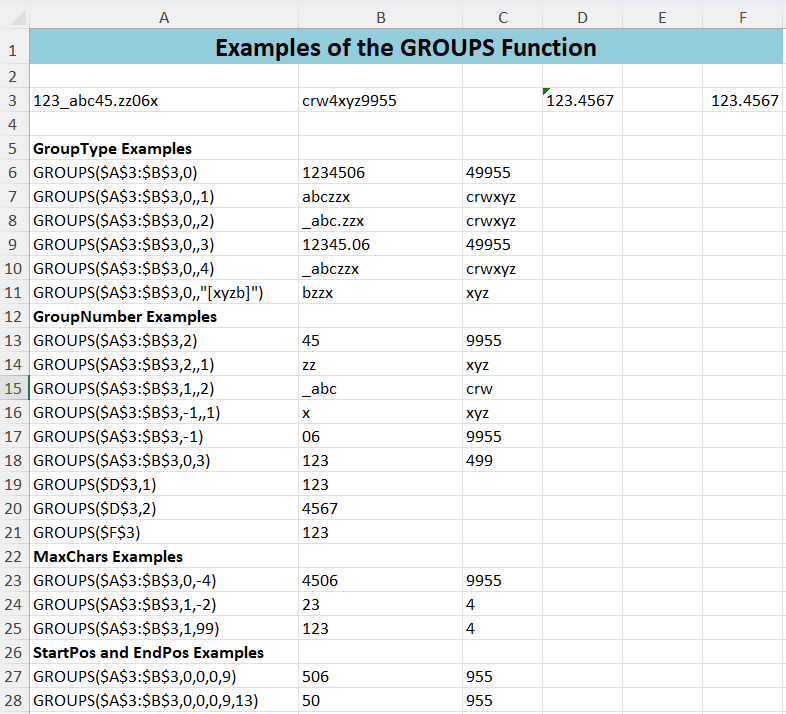
GROUPS Examples:
Rgx.FIND function
Searches a string (or a rectangular array/range) for a substring that matches a regular expression pattern (or a rectangular array/range of patterns).
Returns the position (or array of positions) of the Nth substring matching the Regular Expression pattern.
Rgx.FIND is a multi-threaded, non-volatile array function.
Rgx.FIND Syntax
Rgx.FIND(String, RegExp, Nth, Case_Sensitive)
The first 2 parameters are required; the last 2 parameters are optional.
String (required)
Constant, range or array containing the string(s) to be searched for the Regular Expression Patterns.
RegExp (required)
Specifies the Regular Expression(s) to be used when matching String. If String is an array or a multi-cell range then RegExp must contain a matching set (same number of rows and columns as String) of regular expressions
Nth (optional – default 1)
The start position of the Nth match of the substring is returned.
Case_Sensitive (optional)
TRUE to make the pattern-matching case-sensitive. The default is FALSE.
Rgx.FIND Examples
