|
Show Icons in the component boxes
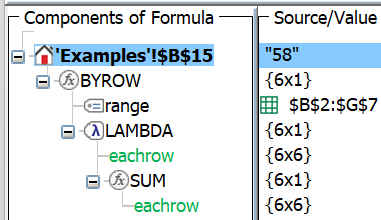
The available Icons are:
 Lambda Function
 The Home Cell
 Range reference: Sheet1'!$A$1
 Reference is an empty Cell
 External reference: 'D:\Users\Charles Williams\Documents\[Book5.xlsx]Sheet1'!$A$1
 Structured reference: Table2[[#All],[married jointly]]
 3-Dimensional reference: Sheet1:Tax!B10:C16
 Individual Sheet reference from a 3-D Reference: Tax!B10:C16
 Named Range or Dynamic Named Range reference
 Named Formula (not returning reference): for example PISquared =PI()^2
  Named Variable within a LET function: for example X in LET(X,45,X+$A$1)
 Source reference, for example the source cell of a VLOOKUP result
 Reference result from Implicit Intersection with a row or column:
 Reference result from Implicit Intersection when there is no intersecting row or column
 Reference result from Explicit Intersection of 2 references: K19:K30 H24:M24
 Reference result from intersection with used range.
 Function Component that does not directly return a reference: SUM …
 Function returning a reference: OFFSET, INDIRECT, INDEX, XLOOKUP …
 Component that does not return a reference: A5*B5
 Component returning a reference: INDEX($F$4:$F$7,2,1):INDEX($H$4:$H$7,4,1)
 Criteria Component in a SUMIFS, COUNTIFS, …IFS function: Table2[married jointly],">" & D5
 A constant, for example 4.5, “FastExcel”, True, #N/A
 An array of constants, for example {1,2,3;4,5,6}
 A Tooltip shown as a Component node in the TreeView
 The Root Cell for a Dynamic Array  A Rich Data cell
|

