|
Name Manager Settings
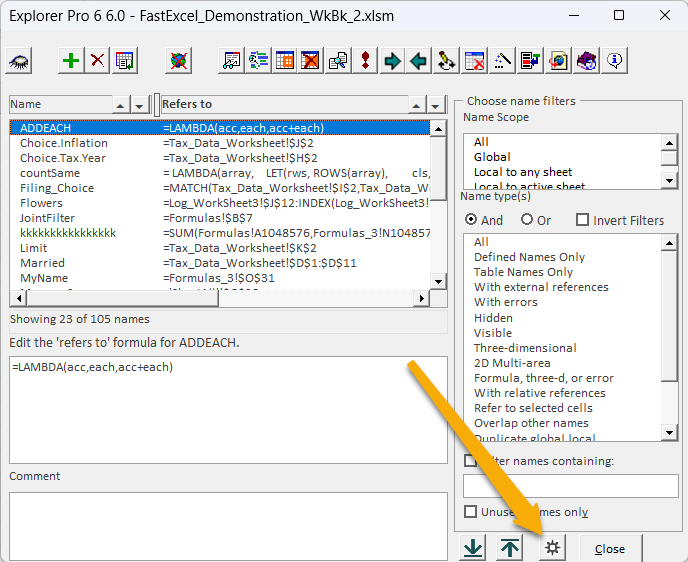
Click the Settings button to show the Name Manager Settings form.
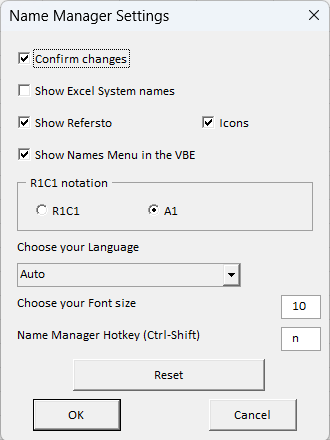
Confirm Changes
|

|
Check the Confirm Changes box to get prompts to confirm any changes you make with the action buttons
|
Show Excel System Names
Check this box to show Excel’s system names (like Print_Area, Print_Titles, _FilterDatabase). In general it is recommended not to modify these names or to delete them.
Show Refersto
Check this box to have the name manager show the refersto properties next to the names listing.
Icons
Check this box to show Icons for the Name manager Action buttons:

Uncheck this box to show Buttons:

R1C1 Notation
|
Repair corrupt names by clicking the R1C1 names checkbox twice!
|
Toggles between R1C1 and A1 worksheet reference style (Same as in Tools, Options, General tab). Please note that this is a “permanent” change, it stays in effect after closing the name manager
|
This checkbox may also be used to repair corrupt names in any workbook. Simply click it twice and you will be prompted to rename any corrupt name!
Choose Language
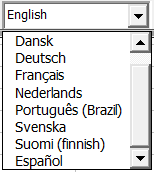
Choose one of the available languages. After pressing OK, this language will be used in all messages and on all user forms.
Choose Font Size
The font size chosen will apply to noth Name manager Oro and Formula Explorer
Name Manager Hotkey
Changes the hotkey used to launch Name Manager Pro
|

